API reference#
- class Clustergram(k_range=None, backend=None, method='kmeans', verbose=True, **kwargs)#
Clustergram class mimicking the interface of clustering class (e.g.
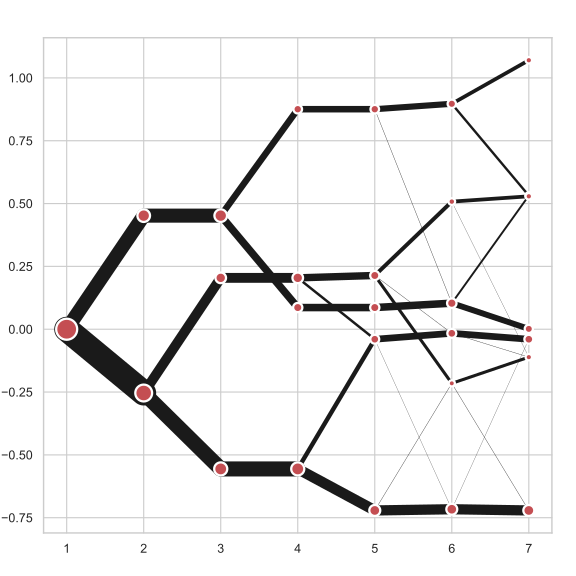
KMeans).Clustergram is a graph used to examine how cluster members are assigned to clusters as the number of clusters increases. This graph is useful in exploratory analysis for nonhierarchical clustering algorithms such as k-means and for hierarchical cluster algorithms when the number of observations is large enough to make dendrograms impractical.
Clustergram offers three backends for the computation -
scikit-learnandscipywhich use CPU and RAPIDS.AIcuML, which uses GPU. Note that all are optional dependencies but you will need at least one of them to generate clustergram.Alternatively, you can create clustergram using
from_dataorfrom_centersmethods based on alternative clustering algorithms.- Parameters
- k_rangeiterable (default None)
iterable of integer values to be tested as
k(number of cluster or components). Not required for hierarchical clustering but will be applied if given. It is recommended to always use limited range for hierarchical methods as unlimited clustergram can take a while to compute and for large number of observations is not legible.- backend{‘sklearn’, ‘cuML’, ‘scipy’} (default None)
Specify computational backend. Defaults to
sklearnfor'kmeans','gmm', and'minibatchkmeans'methods and to'scipy'for any of hierarchical clustering methods.'scipy'usessklearnfor PCA computation if that is required.sklearndoes computation on CPU,cumlon GPU.- method{‘kmeans’, ‘gmm’, ‘minibatchkmeans’, ‘hierarchical’} (default ‘kmeans’)
Clustering method.
kmeansuses K-Means clustering, either assklearn.cluster.KMeansorcuml.KMeans.gmmuses Gaussian Mixture Model assklearn.mixture.GaussianMixtureminibatchkmeansuses Mini Batch K-Means assklearn.cluster.MiniBatchKMeanshierarchicaluses hierarchical/agglomerative clustering asscipy.cluster.hierarchy.linkage. See
Note that
gmmandminibatchkmeansare currently supported only withsklearnbackend.- verbosebool (default True)
Print progress and time of individual steps.
- **kwargs
Additional arguments passed to the model (e.g.
KMeans), e.g.random_state. Passlinkageto specify linkage method in case of hierarchical clustering (e.g.linkage='ward'). See the documentation of scipy for details. Ifmethod='gmm', you can passbic=Trueto store BIC value inClustergram.bic.
References
The clustergram: A graph for visualizing hierarchical and nonhierarchical cluster analyses: https://journals.sagepub.com/doi/10.1177/1536867X0200200405
Tal Galili’s R implementation: https://www.r-statistics.com/2010/06/clustergram-visualization-and-diagnostics-for-cluster-analysis-r-code/
Examples
>>> c_gram = clustergram.Clustergram(range(1, 9))
>>> c_gram.fit(data)
>>> c_gram.plot()
Specifying parameters:
>>> c_gram2 = clustergram.Clustergram(
...     range(1, 9), backend="cuML", random_state=0
... )
>>> c_gram2.fit(cudf_data)
>>> c_gram2.plot(figsize=(12, 12))
- Attributes
labels_DataFrameDataFrame with cluster labels for each option.
cluster_centers_dictDictionary with cluster centers for each option.
linkage_numpy.ndarrayLinkage for hierarchical methods.
bic_SeriesBayesian Information Criterion for each option for Gaussian Mixture Model.
Methods
bokeh([fig, size, line_width, ...])Generate interactive clustergram plot based on cluster centre mean values using Bokeh.
Compute the Calinski and Harabasz score.
Compute the Davies-Bouldin score.
fit(X[, y])Compute clustering for each k within set range.
from_centers(cluster_centers, labels[, data])Create clustergram based on cluster centers dictionary and labels DataFrame.
from_data(data, labels[, method])Create clustergram based on data and labels DataFrame.
plot([ax, size, linewidth, cluster_style, ...])Generate clustergram plot based on cluster centre mean values.
silhouette_score(**kwargs)Compute the mean Silhouette Coefficient of all samples.
- bokeh(fig=None, size=1, line_width=1, cluster_style=None, line_style=None, figsize=None, pca_weighted=True, pca_kwargs={}, pca_component=1)#
Generate interactive clustergram plot based on cluster centre mean values using Bokeh.
Requires
bokeh.- Parameters
- figbokeh.plotting.figure.Figure (default None)
bokeh figure on which to draw the plot
- sizefloat (default 1)
multiplier of the size of a cluster centre indication. Size is determined as
50 / countof observations in a cluster multiplied bysize.- line_widthfloat (default 1)
multiplier of the linewidth of a branch. Line width is determined as
50 / countof observations in a branch multiplied by line_width.- cluster_styledict (default None)
Style options to be passed on to the cluster centre plot, such as
color,line_width,line_colororalpha.- line_styledict (default None)
Style options to be passed on to branches, such as
color,line_width,line_colororalpha.- figsizetuple of integers (default None)
Size of the resulting
bokeh.plotting.figure.Figure. If the argumentfigureis given explicitly,figsizeis ignored.- pca_weightedbool (default True)
Whether use PCA weighted mean of clusters or standard mean of clusters on y-axis.
- pca_kwargsdict (default {})
Additional arguments passed to the PCA object, e.g.
svd_solver. Applies only ifpca_weighted=True.- pca_componentint (default 1)
The principal component used to weigh mean of clusters if
pca_weighted=True. The PCA computation is cached so it is cheap to compare multiple options. However, if you usepca=1first, when tryingpca=2the PCA is run again as it computed only for the maxpcarequested. If you first run plot withpca=2, the second withpca=1does not trigger computation.
- Returns
- figurebokeh figure instance
Notes
Before plotting,
Clustergramneeds to compute the summary values. Those are computed on the first call of each option (pca_weighted=True/False).Examples
>>> from bokeh.plotting import show
>>> c_gram = clustergram.Clustergram(range(1, 9))
>>> c_gram.fit(data)
>>> f = c_gram.bokeh()
>>> show(f)
For the best experience in Jupyter notebooks, specify bokeh output first:
>>> from bokeh.io import output_notebook
>>> from bokeh.plotting import show
>>> output_notebook()
>>> c_gram = clustergram.Clustergram(range(1, 9))
>>> c_gram.fit(data)
>>> f = c_gram.bokeh()
>>> show(f)
- calinski_harabasz_score()#
Compute the Calinski and Harabasz score.
See the documentation of
sklearn.metrics.calinski_harabasz_scorefor details.Once computed, resulting Series is available as
Clustergram.calinski_harabasz. Calling the original method will compute the score from the beginning.- Returns
- calinski_harabaszpd.Series
Notes
The algortihm uses
sklearn. WithcuMLbackend, data are converted on the fly.Examples
>>> c_gram = clustergram.Clustergram(range(1, 9))
>>> c_gram.fit(data)
>>> c_gram.calinski_harabasz_score()
2      23.176629
3      30.643018
4      55.223336
5    3116.435184
6    3899.068689
7    4439.306049
Name: calinski_harabasz_score, dtype: float64
Once computed:
>>> c_gram.calinski_harabasz_
2      23.176629
3      30.643018
4      55.223336
5    3116.435184
6    3899.068689
7    4439.306049
Name: calinski_harabasz_score, dtype: float64
- davies_bouldin_score()#
Compute the Davies-Bouldin score.
See the documentation of
sklearn.metrics.davies_bouldin_scorefor details.Once computed, resulting Series is available as
Clustergram.davies_bouldin. Calling the original method will recompute the score.- Returns
- davies_bouldinpd.Series
Notes
The algortihm uses
sklearn. WithcuMLbackend, data are converted on the fly.Examples
>>> c_gram = clustergram.Clustergram(range(1, 9))
>>> c_gram.fit(data)
>>> c_gram.davies_bouldin_score()
2    0.249366
3    0.351812
4    0.347580
5    0.055679
6    0.030516
7    0.025207
Name: davies_bouldin_score, dtype: float64
Once computed:
>>> c_gram.davies_bouldin
2    0.249366
3    0.351812
4    0.347580
5    0.055679
6    0.030516
7    0.025207
Name: davies_bouldin_score, dtype: float64
- fit(X, y=None, **kwargs)#
Compute clustering for each k within set range.
- Parameters
- Xarray-like
Input data to be clustered. It is expected that data are scaled. Can be
numpy.array,pandas.DataFrameor their RAPIDS counterparts.- yignored
Not used, present here for API consistency by convention.
- **kwargs
Additional arguments passed to the
.fit()method of the model, e.g.sample_weight.
- Returns
- self
Fitted clustergram.
Examples
>>> c_gram = clustergram.Clustergram(range(1, 9))
>>> c_gram.fit(data)
- classmethod from_centers(cluster_centers, labels, data=None)#
Create clustergram based on cluster centers dictionary and labels DataFrame.
- Parameters
- cluster_centersdict
dictionary of cluster centers with keys encoding the number of clusters and values being
M``x````Narrays whereM== key andN== number of variables in the original dataset. Entries should be ordered based on keys.- labelspandas.DataFrame
DataFrame with columns representing cluster labels and rows representing observations. Columns must be equal to
cluster_centerskeys.- dataarray-like (optional)
array used as an input of the clustering algorithm with
Ncolumns. Required for plot(pca_weighted=True) plotting option. Otherwise only plot(pca_weighted=False) is available.
- Returns
- clustegram.Clustergram
Notes
The algortihm uses
sklearnandpandasto generate clustergram. GPU option is not implemented.Examples
>>> import pandas as pd
>>> import numpy as np
>>> labels = pd.DataFrame({1: [0, 0, 0], 2: [0, 0, 1], 3: [0, 2, 1]})
>>> labels
   1  2  3
0  0  0  0
1  0  0  2
2  0  1  1
>>> centers = {
...             1: np.array([[0, 0]]),
...             2: np.array([[-1, -1], [1, 1]]),
...             3: np.array([[-1, -1], [1, 1], [0, 0]]),
...         }
>>> cgram = Clustergram.from_centers(centers, labels)
>>> cgram.plot(pca_weighted=False)
>>> data = np.array([[-1, -1], [1, 1], [0, 0]])
>>> cgram = Clustergram.from_centers(centers, labels, data=data)
>>> cgram.plot()
- classmethod from_data(data, labels, method='mean')#
Create clustergram based on data and labels DataFrame.
Cluster centers are created as mean values or median values as a groupby function over data using individual labels.
- Parameters
- dataarray-like
array used as an input of the clustering algorithm in the
(M, N)shape whereM== number of observations andN== number of variables- labelspandas.DataFrame
DataFrame with columns representing cluster labels and rows representing observations. Columns must be equal to
cluster_centerskeys.- method{‘mean’, ‘median’}, default ‘mean’
Method of computation of cluster centres.
- Returns
- clustegram.Clustergram
Notes
The algortihm uses
sklearnandpandasto generate clustergram. GPU option is not implemented.Examples
>>> import pandas as pd
>>> import numpy as np
>>> data = np.array([[-1, -1, 0, 10], [1, 1, 10, 2], [0, 0, 20, 4]])
>>> data
array([[-1, -1,  0, 10],
       [ 1,  1, 10,  2],
       [ 0,  0, 20,  4]])
>>> labels = pd.DataFrame({1: [0, 0, 0], 2: [0, 0, 1], 3: [0, 2, 1]})
>>> labels
   1  2  3
0  0  0  0
1  0  0  2
2  0  1  1
>>> cgram = Clustergram.from_data(data, labels)
>>> cgram.plot()
- plot(ax=None, size=1, linewidth=1, cluster_style=None, line_style=None, figsize=None, k_range=None, pca_weighted=True, pca_kwargs={}, pca_component=1)#
Generate clustergram plot based on cluster centre mean values.
- Parameters
- axmatplotlib.pyplot.Artist (default None)
matplotlib axis on which to draw the plot
- sizefloat (default 1)
multiplier of the size of a cluster centre indication. Size is determined as
500 / countof observations in a cluster multiplied bysize.- linewidthfloat (default 1)
multiplier of the linewidth of a branch. Line width is determined as
50 / countof observations in a branch multiplied by linewidth.- cluster_styledict (default None)
Style options to be passed on to the cluster centre plot, such as
color,linewidth,edgecolororalpha.- line_styledict (default None)
Style options to be passed on to branches, such as
color,linewidth,edgecolororalpha.- figsizetuple of integers (default None)
Size of the resulting
matplotlib.figure.Figure. If the argumentaxis given explicitly,figsizeis ignored.- k_rangeiterable (default None)
iterable of integer values to be plotted. In none,
Clustergram.k_rangewill be used. Has to be a subset ofClustergram.k_range.- pca_weightedbool (default True)
Whether use PCA weighted mean of clusters or standard mean of clusters on y-axis.
- pca_kwargsdict (default {})
Additional arguments passed to the PCA object, e.g.
svd_solver. Applies only ifpca_weighted=True.- pca_componentint (default 1)
The principal component used to weigh mean of clusters if
pca_weighted=True. The PCA computation is cached so it is cheap to compare multiple options. However, if you usepca=1first, when tryingpca=2the PCA is run again as it computed only for the maxpcarequested. If you first run plot withpca=2, the second withpca=1does not trigger the PCA computation.
- Returns
- axmatplotlib axis instance
Notes
Before plotting,
Clustergramneeds to compute the summary values. Those are computed on the first call of each option (pca_weighted=True/False).Examples
>>> c_gram = clustergram.Clustergram(range(1, 9))
>>> c_gram.fit(data)
>>> c_gram.plot()
- silhouette_score(**kwargs)#
Compute the mean Silhouette Coefficient of all samples.
See the documentation of
sklearn.metrics.silhouette_scorefor details.Once computed, resulting Series is available as
Clustergram.silhouette. Calling the original method will compute the score from the beginning.- Parameters
- **kwargs
Additional arguments passed to the silhouette_score function, e.g.
sample_size.
- Returns
- silhouettepd.Series
Notes
The algortihm uses
sklearn. WithcuMLbackend, data are converted on the fly.Examples
>>> c_gram = clustergram.Clustergram(range(1, 9))
>>> c_gram.fit(data)
>>> c_gram.silhouette_score()
2    0.702450
3    0.644272
4    0.767728
5    0.948991
6    0.769985
7    0.575644
Name: silhouette_score, dtype: float64
Once computed:
>>> c_gram.silhouette_
2    0.702450
3    0.644272
4    0.767728
5    0.948991
6    0.769985
7    0.575644
Name: silhouette_score, dtype: float64